The 35-Watt Roommate (Part 6): Ads? Never Heard of Them.
- 1.The 35-Watt Roommate (Part 1): From Memory Hunger to Mini Powerhouse
- 2.The 35-Watt Roommate (Part 2): The Cloud in a Cabinet
- 3.The 35-Watt Roommate (Part 3): Middle-earth and the Digital Infarction
- 4.The 35-Watt Roommate (Part 4): Docker Cleanup and Surgical Data Recovery
- 5.The 35-Watt Roommate (Part 5): Monitoring, or 'Why is the internet constantly asking for my .php files?'
- 6.The 35-Watt Roommate (Part 6): Ads? Never Heard of Them.
- 7.The 35-Watt Roommate (Part 7): Goodbye Fritz!Box, Hello Ubiquiti
- 8.The 35-Watt Roommate (Part 8): Umami Analytics, or How a Password with Special Characters Broke Everything
The goal: quiet across the whole network
Ads on the internet are exhausting, on phones, on smart TVs, everywhere. For anyone running a homeserver the obvious answer is a network-wide DNS blocker. Pi-hole was the default choice for years, but I went with AdGuard Home. It feels more modern, does DNS-over-HTTPS and DNS-over-TLS out of the box, and I like the interface more.
Sounds easy enough, right? Start the container, done. That was optimistic.
The final boss: port 53
My first attempt was to run the container on the host network. That failed immediately because of port 53.
Port 53 is the standard port for DNS requests, and on almost every modern Linux server, my Ubuntu host included, it is already taken by systemd-resolved. The container could not start.
I could have disabled systemd-resolved, but poking around in the host system goes against how I want to run this machine. The Docker host should stay as vanilla as possible. So, plan B.
The fix: Macvlan
A Docker Macvlan network is made for cases like this. The container behaves like a real physical device on the network: it gets its own MAC address and, more importantly, its own IP address from the router, independent of the host server. No more port conflict on port 53.
My network is dual-stack, so I did it properly. The container gets a dedicated IPv4 address (192.168.50.250) and a dedicated IPv6 address, a stable ULA starting with fd....
The next problem: Traefik
The DNS blocker worked now, but I wanted the web dashboard on my own domain (adguard.dieck-labs.de) behind Traefik as a reverse proxy, instead of typing IP addresses into the browser. This is where it got annoying.
Network isolation
For Traefik to reach the container, both services need to share the same internal Docker network, in my case apps. But a container attached to Macvlan is isolated from the normal Docker world. So the container has to join both networks: Macvlan for DNS traffic from the LAN, apps for Traefik.
The 502 Bad Gateway
After wiring it into Traefik I got nothing but 502 Bad Gateway. Hours of debugging.
The cause: if you do the initial AdGuard Home setup via the Macvlan IP, it often configures itself to listen only on that one interface, so requests coming from Traefik through the internal apps network are ignored. In AdGuardHome.yaml I had to bind the web UI to 0.0.0.0 so it listens on all interfaces, and move the admin UI to an uncommon port like 8087. Then Traefik can reach it while DNS keeps using port 53.
The architecture
This is what the traffic flow looks like now:
%3btext-align:center%3b%7d%23mermaid-0 .edgeLabel p%7bbackground-color:rgba(232%2c232%2c232%2c 0.8)%3b%7d%23mermaid-0 .edgeLabel rect%7bopacity:0.5%3bbackground-color:rgba(232%2c232%2c232%2c 0.8)%3bfill:rgba(232%2c232%2c232%2c 0.8)%3b%7d%23mermaid-0 .labelBkg%7bbackground-color:rgba(232%2c 232%2c 232%2c 0.5)%3b%7d%23mermaid-0 .cluster rect%7bfill:%23ffffde%3bstroke:%23aaaa33%3bstroke-width:1px%3b%7d%23mermaid-0 .cluster text%7bfill:%23333%3b%7d%23mermaid-0 .cluster span%7bcolor:%23333%3b%7d%23mermaid-0 .node .collapsed-indicator%7bfill:%23aaaa33%3bstroke:none%3bopacity:0.6%3b%7d%23mermaid-0 .node .collapsed-separator%7bstroke:%23aaaa33%3bstroke-width:0.75px%3b%7d%23mermaid-0 div.mermaidTooltip%7bposition:absolute%3btext-align:center%3bmax-width:200px%3bpadding:2px%3bfont-family:arial%2csans-serif%3bfont-size:12px%3bbackground:hsl(80%2c 100%25%2c 96.2745098039%25)%3bborder:1px solid %23aaaa33%3bborder-radius:2px%3bpointer-events:none%3bz-index:100%3b%7d%23mermaid-0 .flowchartTitleText%7btext-anchor:middle%3bfont-size:18px%3bfill:%23333%3b%7d%23mermaid-0 rect.text%7bfill:none%3bstroke-width:0%3b%7d%23mermaid-0 .icon-shape%2c%23mermaid-0 .image-shape%7bbackground-color:rgba(232%2c232%2c232%2c 0.8)%3btext-align:center%3b%7d%23mermaid-0 .icon-shape p%2c%23mermaid-0 .image-shape p%7bbackground-color:rgba(232%2c232%2c232%2c 0.8)%3bpadding:2px%3b%7d%23mermaid-0 .icon-shape .label rect%2c%23mermaid-0 .image-shape .label rect%7bopacity:0.5%3bbackground-color:rgba(232%2c232%2c232%2c 0.8)%3bfill:rgba(232%2c232%2c232%2c 0.8)%3b%7d%23mermaid-0 .label-icon%7bdisplay:inline-block%3bheight:1em%3boverflow:visible%3bvertical-align:-0.125em%3b%7d%23mermaid-0 .node .label-icon path%7bfill:currentColor%3bstroke:revert%3bstroke-width:revert%3b%7d%23mermaid-0 .node .neo-node%7bstroke:%239370DB%3b%7d%23mermaid-0 %5bdata-look='neo'%5d.node rect%2c%23mermaid-0 %5bdata-look='neo'%5d.cluster rect%2c%23mermaid-0 %5bdata-look='neo'%5d.node polygon%7bstroke:%239370DB%3bfilter:drop-shadow(1px 2px 2px rgba(185%2c 185%2c 185%2c 1))%3b%7d%23mermaid-0 %5bdata-look='neo'%5d.swimlane.cluster rect%7bfilter:none%3b%7d%23mermaid-0 %5bdata-look='neo'%5d.node path%7bstroke:%239370DB%3bstroke-width:1px%3b%7d%23mermaid-0 %5bdata-look='neo'%5d.node .outer-path%7bfilter:drop-shadow(1px 2px 2px rgba(185%2c 185%2c 185%2c 1))%3b%7d%23mermaid-0 %5bdata-look='neo'%5d.node .neo-line path%7bstroke:%239370DB%3bfilter:none%3b%7d%23mermaid-0 %5bdata-look='neo'%5d.node circle%7bstroke:%239370DB%3bfilter:drop-shadow(1px 2px 2px rgba(185%2c 185%2c 185%2c 1))%3b%7d%23mermaid-0 %5bdata-look='neo'%5d.node circle .state-start%7bfill:black%3b%7d%23mermaid-0 %5bdata-look='neo'%5d.icon-shape .icon%7bfill:%239370DB%3bfilter:drop-shadow(1px 2px 2px rgba(185%2c 185%2c 185%2c 1))%3b%7d%23mermaid-0 %5bdata-look='neo'%5d.icon-shape .icon-neo path%7bstroke:%239370DB%3bfilter:drop-shadow(1px 2px 2px rgba(185%2c 185%2c 185%2c 1))%3b%7d%23mermaid-0 :root%7b--mermaid-font-family:arial%2csans-serif%3b%7d%3c/style%3e%3cg%3e%3cmarker id='mermaid-0_flowchart-v2-pointEnd' class='marker flowchart-v2' viewBox='0 0 10 10' refX='5' refY='5' markerUnits='userSpaceOnUse' markerWidth='8' markerHeight='8' orient='auto'%3e%3cpath d='M 0 0 L 10 5 L 0 10 z' class='arrowMarkerPath' style='stroke-width: 1%3b stroke-dasharray: 1%2c 0%3b'/%3e%3c/marker%3e%3cmarker id='mermaid-0_flowchart-v2-pointStart' class='marker flowchart-v2' viewBox='0 0 10 10' refX='4.5' refY='5' markerUnits='userSpaceOnUse' markerWidth='8' markerHeight='8' orient='auto'%3e%3cpath d='M 0 5 L 10 10 L 10 0 z' class='arrowMarkerPath' style='stroke-width: 1%3b stroke-dasharray: 1%2c 0%3b'/%3e%3c/marker%3e%3cmarker id='mermaid-0_flowchart-v2-pointEnd-margin' class='marker flowchart-v2' viewBox='0 0 11.5 14' refX='11.5' refY='7' markerUnits='userSpaceOnUse' markerWidth='10.5' markerHeight='14' orient='auto'%3e%3cpath d='M 0 0 L 11.5 7 L 0 14 z' class='arrowMarkerPath' style='stroke-width: 0%3b stroke-dasharray: 1%2c 0%3b'/%3e%3c/marker%3e%3cmarker id='mermaid-0_flowchart-v2-pointStart-margin' class='marker flowchart-v2' viewBox='0 0 11.5 14' refX='1' refY='7' markerUnits='userSpaceOnUse' markerWidth='11.5' markerHeight='14' orient='auto'%3e%3cpolygon points='0%2c7 11.5%2c14 11.5%2c0' class='arrowMarkerPath' style='stroke-width: 0%3b stroke-dasharray: 1%2c 0%3b'/%3e%3c/marker%3e%3cmarker id='mermaid-0_flowchart-v2-circleEnd' class='marker flowchart-v2' viewBox='0 0 10 10' refX='11' refY='5' markerUnits='userSpaceOnUse' markerWidth='11' markerHeight='11' orient='auto'%3e%3ccircle cx='5' cy='5' r='5' class='arrowMarkerPath' style='stroke-width: 1%3b stroke-dasharray: 1%2c 0%3b'/%3e%3c/marker%3e%3cmarker id='mermaid-0_flowchart-v2-circleStart' class='marker flowchart-v2' viewBox='0 0 10 10' refX='-1' refY='5' markerUnits='userSpaceOnUse' markerWidth='11' markerHeight='11' orient='auto'%3e%3ccircle cx='5' cy='5' r='5' class='arrowMarkerPath' style='stroke-width: 1%3b stroke-dasharray: 1%2c 0%3b'/%3e%3c/marker%3e%3cmarker id='mermaid-0_flowchart-v2-circleEnd-margin' class='marker flowchart-v2' viewBox='0 0 10 10' refY='5' refX='12.25' markerUnits='userSpaceOnUse' markerWidth='14' markerHeight='14' orient='auto'%3e%3ccircle cx='5' cy='5' r='5' class='arrowMarkerPath' style='stroke-width: 0%3b stroke-dasharray: 1%2c 0%3b'/%3e%3c/marker%3e%3cmarker id='mermaid-0_flowchart-v2-circleStart-margin' class='marker flowchart-v2' viewBox='0 0 10 10' refX='-2' refY='5' markerUnits='userSpaceOnUse' markerWidth='14' markerHeight='14' orient='auto'%3e%3ccircle cx='5' cy='5' r='5' class='arrowMarkerPath' style='stroke-width: 0%3b stroke-dasharray: 1%2c 0%3b'/%3e%3c/marker%3e%3cmarker id='mermaid-0_flowchart-v2-crossEnd' class='marker cross flowchart-v2' viewBox='0 0 11 11' refX='12' refY='5.2' markerUnits='userSpaceOnUse' markerWidth='11' markerHeight='11' orient='auto'%3e%3cpath d='M 1%2c1 l 9%2c9 M 10%2c1 l -9%2c9' class='arrowMarkerPath' style='stroke-width: 2%3b stroke-dasharray: 1%2c 0%3b'/%3e%3c/marker%3e%3cmarker id='mermaid-0_flowchart-v2-crossStart' class='marker cross flowchart-v2' viewBox='0 0 11 11' refX='-1' refY='5.2' markerUnits='userSpaceOnUse' markerWidth='11' markerHeight='11' orient='auto'%3e%3cpath d='M 1%2c1 l 9%2c9 M 10%2c1 l -9%2c9' class='arrowMarkerPath' style='stroke-width: 2%3b stroke-dasharray: 1%2c 0%3b'/%3e%3c/marker%3e%3cmarker id='mermaid-0_flowchart-v2-crossEnd-margin' class='marker cross flowchart-v2' viewBox='0 0 15 15' refX='17.7' refY='7.5' markerUnits='userSpaceOnUse' markerWidth='12' markerHeight='12' orient='auto'%3e%3cpath d='M 1%2c1 L 14%2c14 M 1%2c14 L 14%2c1' class='arrowMarkerPath' style='stroke-width: 2.5%3b'/%3e%3c/marker%3e%3cmarker id='mermaid-0_flowchart-v2-crossStart-margin' class='marker cross flowchart-v2' viewBox='0 0 15 15' refX='-3.5' refY='7.5' markerUnits='userSpaceOnUse' markerWidth='12' markerHeight='12' orient='auto'%3e%3cpath d='M 1%2c1 L 14%2c14 M 1%2c14 L 14%2c1' class='arrowMarkerPath' style='stroke-width: 2.5%3b stroke-dasharray: 1%2c 0%3b'/%3e%3c/marker%3e%3cg class='root'%3e%3cg class='clusters'%3e%3cg class='cluster' id='mermaid-0-Internet' data-look='classic'%3e%3crect style='' x='8' y='313' width='424.09375' height='305'/%3e%3cg class='cluster-label' transform='translate(192.9140625%2c 313)'%3e%3cforeignObject width='54.265625' height='24'%3e%3cdiv xmlns='http://www.w3.org/1999/xhtml' style='display: table-cell%3b white-space: nowrap%3b line-height: 1.5%3b'%3e%3cspan class='nodeLabel'%3e%3cp%3eInternet%3c/p%3e%3c/span%3e%3c/div%3e%3c/foreignObject%3e%3c/g%3e%3c/g%3e%3cg class='cluster' id='mermaid-0-subGraph1' data-look='classic'%3e%3crect style='' x='50.69140625' y='692' width='795.01953125' height='128'/%3e%3cg class='cluster-label' transform='translate(362.380859375%2c 692)'%3e%3cforeignObject width='171.640625' height='24'%3e%3cdiv xmlns='http://www.w3.org/1999/xhtml' style='display: table-cell%3b white-space: nowrap%3b line-height: 1.5%3b'%3e%3cspan class='nodeLabel'%3e%3cp%3eLenovo M920q (Docker)%3c/p%3e%3c/span%3e%3c/div%3e%3c/foreignObject%3e%3c/g%3e%3c/g%3e%3cg class='cluster' id='mermaid-0-subGraph0' data-look='classic'%3e%3crect style='' x='452.09375' y='8' width='617.859375' height='433'/%3e%3cg class='cluster-label' transform='translate(642.734375%2c 8)'%3e%3cforeignObject width='236.578125' height='24'%3e%3cdiv xmlns='http://www.w3.org/1999/xhtml' style='display: table-cell%3b white-space: nowrap%3b line-height: 1.5%3b'%3e%3cspan class='nodeLabel'%3e%3cp%3eHome Network (192.168.50.0/24)%3c/p%3e%3c/span%3e%3c/div%3e%3c/foreignObject%3e%3c/g%3e%3c/g%3e%3c/g%3e%3cg class='edgePaths'%3e%3cpath d='M568.898%2c239L568.898%2c245.167C568.898%2c251.333%2c568.898%2c263.667%2c568.898%2c276C568.898%2c288.333%2c568.898%2c300.667%2c588.272%2c312.862C607.646%2c325.057%2c646.394%2c337.115%2c665.768%2c343.143L685.142%2c349.172' id='mermaid-0-L_Phone_AGH_0' class='edge-thickness-normal edge-pattern-solid edge-thickness-normal edge-pattern-solid flowchart-link' style='%3b' data-edge='true' data-et='edge' data-id='L_Phone_AGH_0' data-points='W3sieCI6NTY4Ljg5ODQzNzUsInkiOjIzOX0seyJ4Ijo1NjguODk4NDM3NSwieSI6Mjc2fSx7IngiOjU2OC44OTg0Mzc1LCJ5IjozMTN9LHsieCI6Njg4Ljk2MDkzNzUsInkiOjM1MC4zNjA0ODAxMzM3MDgxfV0=' data-look='classic' marker-end='url(%23mermaid-0_flowchart-v2-pointEnd)'/%3e%3cpath d='M774.57%2c239L774.57%2c245.167C774.57%2c251.333%2c774.57%2c263.667%2c774.57%2c276C774.57%2c288.333%2c774.57%2c300.667%2c774.57%2c310.333C774.57%2c320%2c774.57%2c327%2c774.57%2c330.5L774.57%2c334' id='mermaid-0-L_TV_AGH_0' class='edge-thickness-normal edge-pattern-solid edge-thickness-normal edge-pattern-solid flowchart-link' style='%3b' data-edge='true' data-et='edge' data-id='L_TV_AGH_0' data-points='W3sieCI6Nzc0LjU3MDMxMjUsInkiOjIzOX0seyJ4Ijo3NzQuNTcwMzEyNSwieSI6Mjc2fSx7IngiOjc3NC41NzAzMTI1LCJ5IjozMTN9LHsieCI6Nzc0LjU3MDMxMjUsInkiOjMzOH1d' data-look='classic' marker-end='url(%23mermaid-0_flowchart-v2-pointEnd)'/%3e%3cpath d='M963.344%2c239L963.344%2c245.167C963.344%2c251.333%2c963.344%2c263.667%2c963.344%2c276C963.344%2c288.333%2c963.344%2c300.667%2c946.781%2c312.449C930.218%2c324.23%2c897.093%2c335.461%2c880.531%2c341.076L863.968%2c346.691' id='mermaid-0-L_Laptop_AGH_0' class='edge-thickness-normal edge-pattern-solid edge-thickness-normal edge-pattern-solid flowchart-link' style='%3b' data-edge='true' data-et='edge' data-id='L_Laptop_AGH_0' data-points='W3sieCI6OTYzLjM0Mzc1LCJ5IjoyMzl9LHsieCI6OTYzLjM0Mzc1LCJ5IjoyNzZ9LHsieCI6OTYzLjM0Mzc1LCJ5IjozMTN9LHsieCI6ODYwLjE3OTY4NzUsInkiOjM0Ny45NzU3ODk0MzAxMjA0fV0=' data-look='classic' marker-end='url(%23mermaid-0_flowchart-v2-pointEnd)'/%3e%3cpath d='M694.082%2c101.247L673.218%2c109.04C652.354%2c116.832%2c610.626%2c132.416%2c589.762%2c145.708C568.898%2c159%2c568.898%2c170%2c568.898%2c175.5L568.898%2c181' id='mermaid-0-L_FB_Phone_0' class='edge-thickness-normal edge-pattern-dotted edge-thickness-normal edge-pattern-solid flowchart-link' style='%3b' data-edge='true' data-et='edge' data-id='L_FB_Phone_0' data-points='W3sieCI6Njk0LjA4MjAzMTI1LCJ5IjoxMDEuMjQ3NDkwMTYyMjAzNjZ9LHsieCI6NTY4Ljg5ODQzNzUsInkiOjE0OH0seyJ4Ijo1NjguODk4NDM3NSwieSI6MTg1fV0=' data-look='classic' marker-end='url(%23mermaid-0_flowchart-v2-pointEnd)'/%3e%3cpath d='M773.511%2c111L773.688%2c117.167C773.864%2c123.333%2c774.217%2c135.667%2c774.394%2c147.333C774.57%2c159%2c774.57%2c170%2c774.57%2c175.5L774.57%2c181' id='mermaid-0-L_FB_TV_0' class='edge-thickness-normal edge-pattern-dotted edge-thickness-normal edge-pattern-solid flowchart-link' style='%3b' data-edge='true' data-et='edge' data-id='L_FB_TV_0' data-points='W3sieCI6NzczLjUxMTA1MDU3NTY1NzksInkiOjExMX0seyJ4Ijo3NzQuNTcwMzEyNSwieSI6MTQ4fSx7IngiOjc3NC41NzAzMTI1LCJ5IjoxODV9XQ==' data-look='classic' marker-end='url(%23mermaid-0_flowchart-v2-pointEnd)'/%3e%3cpath d='M850.707%2c103.169L869.48%2c110.641C888.253%2c118.113%2c925.798%2c133.056%2c944.571%2c146.028C963.344%2c159%2c963.344%2c170%2c963.344%2c175.5L963.344%2c181' id='mermaid-0-L_FB_Laptop_0' class='edge-thickness-normal edge-pattern-dotted edge-thickness-normal edge-pattern-solid flowchart-link' style='%3b' data-edge='true' data-et='edge' data-id='L_FB_Laptop_0' data-points='W3sieCI6ODUwLjcwNzAzMTI1LCJ5IjoxMDMuMTY5MjgxNzU0MzkzMTR9LHsieCI6OTYzLjM0Mzc1LCJ5IjoxNDh9LHsieCI6OTYzLjM0Mzc1LCJ5IjoxODV9XQ==' data-look='classic' marker-end='url(%23mermaid-0_flowchart-v2-pointEnd)'/%3e%3cpath d='M688.961%2c397.529L658.747%2c404.774C628.533%2c412.019%2c568.104%2c426.51%2c537.89%2c439.921C507.676%2c453.333%2c507.676%2c465.667%2c507.676%2c484.5C507.676%2c503.333%2c507.676%2c528.667%2c507.676%2c552C507.676%2c575.333%2c507.676%2c596.667%2c507.676%2c613.5C507.676%2c630.333%2c507.676%2c642.667%2c507.676%2c655C507.676%2c667.333%2c507.676%2c679.667%2c515.506%2c689.705C523.336%2c699.742%2c538.996%2c707.485%2c546.826%2c711.356L554.656%2c715.227' id='mermaid-0-L_AGH_TF_0' class='edge-thickness-normal edge-pattern-solid edge-thickness-normal edge-pattern-solid flowchart-link' style='%3b' data-edge='true' data-et='edge' data-id='L_AGH_TF_0' data-points='W3sieCI6Njg4Ljk2MDkzNzUsInkiOjM5Ny41Mjg3MDgzNzkwNzA2fSx7IngiOjUwNy42NzU3ODEyNSwieSI6NDQxfSx7IngiOjUwNy42NzU3ODEyNSwieSI6NDc4fSx7IngiOjUwNy42NzU3ODEyNSwieSI6NTU0fSx7IngiOjUwNy42NzU3ODEyNSwieSI6NjE4fSx7IngiOjUwNy42NzU3ODEyNSwieSI6NjU1fSx7IngiOjUwNy42NzU3ODEyNSwieSI6NjkyfSx7IngiOjU1OC4yNDE4ODIzMjQyMTg4LCJ5Ijo3MTd9XQ==' data-look='classic' marker-end='url(%23mermaid-0_flowchart-v2-pointEnd)'/%3e%3cpath d='M109.469%2c403.836L109.469%2c410.03C109.469%2c416.224%2c109.469%2c428.612%2c109.469%2c440.973C109.469%2c453.333%2c109.469%2c465.667%2c109.469%2c479.333C109.469%2c493%2c109.469%2c508%2c109.469%2c515.5L109.469%2c523' id='mermaid-0-L_User_CF_0' class='edge-thickness-normal edge-pattern-solid edge-thickness-normal edge-pattern-solid flowchart-link' style='%3b' data-edge='true' data-et='edge' data-id='L_User_CF_0' data-points='W3sieCI6MTA5LjQ2ODc1LCJ5Ijo0MDMuODM1OTM3NX0seyJ4IjoxMDkuNDY4NzUsInkiOjQ0MX0seyJ4IjoxMDkuNDY4NzUsInkiOjQ3OH0seyJ4IjoxMDkuNDY4NzUsInkiOjUyN31d' data-look='classic' marker-end='url(%23mermaid-0_flowchart-v2-pointEnd)'/%3e%3cpath d='M109.469%2c581L109.469%2c587.167C109.469%2c593.333%2c109.469%2c605.667%2c109.469%2c618C109.469%2c630.333%2c109.469%2c642.667%2c109.469%2c655C109.469%2c667.333%2c109.469%2c679.667%2c183.006%2c694.753C256.544%2c709.839%2c403.618%2c727.678%2c477.156%2c736.597L550.693%2c745.517' id='mermaid-0-L_CF_TF_0' class='edge-thickness-normal edge-pattern-solid edge-thickness-normal edge-pattern-solid flowchart-link' style='%3b' data-edge='true' data-et='edge' data-id='L_CF_TF_0' data-points='W3sieCI6MTA5LjQ2ODc1LCJ5Ijo1ODF9LHsieCI6MTA5LjQ2ODc1LCJ5Ijo2MTh9LHsieCI6MTA5LjQ2ODc1LCJ5Ijo2NTV9LHsieCI6MTA5LjQ2ODc1LCJ5Ijo2OTJ9LHsieCI6NTU0LjY2NDA2MjUsInkiOjc0NS45OTgyMjMyNzUwOTYzfV0=' data-look='classic' marker-end='url(%23mermaid-0_flowchart-v2-pointEnd)'/%3e%3cpath d='M719.586%2c728.015L737.273%2c722.013C754.961%2c716.01%2c790.336%2c704.005%2c808.023%2c691.836C825.711%2c679.667%2c825.711%2c667.333%2c825.711%2c655C825.711%2c642.667%2c825.711%2c630.333%2c825.711%2c613.5C825.711%2c596.667%2c825.711%2c575.333%2c825.711%2c552C825.711%2c528.667%2c825.711%2c503.333%2c825.711%2c484.5C825.711%2c465.667%2c825.711%2c453.333%2c822.798%2c443.521C819.884%2c433.708%2c814.058%2c426.417%2c811.144%2c422.771L808.231%2c419.125' id='mermaid-0-L_TF_AGH_0' class='edge-thickness-normal edge-pattern-solid edge-thickness-normal edge-pattern-solid flowchart-link' style='%3b' data-edge='true' data-et='edge' data-id='L_TF_AGH_0' data-points='W3sieCI6NzE5LjU4NTkzNzUsInkiOjcyOC4wMTU0MTA3NDYwOTU1fSx7IngiOjgyNS43MTA5Mzc1LCJ5Ijo2OTJ9LHsieCI6ODI1LjcxMDkzNzUsInkiOjY1NX0seyJ4Ijo4MjUuNzEwOTM3NSwieSI6NjE4fSx7IngiOjgyNS43MTA5Mzc1LCJ5Ijo1NTR9LHsieCI6ODI1LjcxMDkzNzUsInkiOjQ3OH0seyJ4Ijo4MjUuNzEwOTM3NSwieSI6NDQxfSx7IngiOjgwNS43MzQxMzA4NTkzNzUsInkiOjQxNn1d' data-look='classic' marker-end='url(%23mermaid-0_flowchart-v2-pointEnd)'/%3e%3cpath d='M747.091%2c416L744.156%2c420.167C741.22%2c424.333%2c735.348%2c432.667%2c662.752%2c443C590.156%2c453.333%2c450.836%2c465.667%2c381.176%2c477.333C311.516%2c489%2c311.516%2c500%2c311.516%2c505.5L311.516%2c511' id='mermaid-0-L_AGH_DNS_0' class='edge-thickness-normal edge-pattern-solid edge-thickness-normal edge-pattern-solid flowchart-link' style='%3b' data-edge='true' data-et='edge' data-id='L_AGH_DNS_0' data-points='W3sieCI6NzQ3LjA5MTMwODU5Mzc1LCJ5Ijo0MTZ9LHsieCI6NzI5LjQ3NjU2MjUsInkiOjQ0MX0seyJ4IjozMTEuNTE1NjI1LCJ5Ijo0Nzh9LHsieCI6MzExLjUxNTYyNSwieSI6NTE1fV0=' data-look='classic' marker-end='url(%23mermaid-0_flowchart-v2-pointEnd)'/%3e%3c/g%3e%3cg class='edgeLabels'%3e%3cg class='edgeLabel' transform='translate(568.8984375%2c 276)'%3e%3cg class='label' data-id='L_Phone_AGH_0' transform='translate(-40.8984375%2c -12)'%3e%3cforeignObject width='81.796875' height='24'%3e%3cdiv xmlns='http://www.w3.org/1999/xhtml' class='labelBkg' style='display: table-cell%3b white-space: nowrap%3b line-height: 1.5%3b max-width: 200px%3b text-align: center%3b'%3e%3cspan class='edgeLabel'%3e%3cp%3eDNS Query%3c/p%3e%3c/span%3e%3c/div%3e%3c/foreignObject%3e%3c/g%3e%3c/g%3e%3cg class='edgeLabel' transform='translate(774.5703125%2c 276)'%3e%3cg class='label' data-id='L_TV_AGH_0' transform='translate(-40.8984375%2c -12)'%3e%3cforeignObject width='81.796875' height='24'%3e%3cdiv xmlns='http://www.w3.org/1999/xhtml' class='labelBkg' style='display: table-cell%3b white-space: nowrap%3b line-height: 1.5%3b max-width: 200px%3b text-align: center%3b'%3e%3cspan class='edgeLabel'%3e%3cp%3eDNS Query%3c/p%3e%3c/span%3e%3c/div%3e%3c/foreignObject%3e%3c/g%3e%3c/g%3e%3cg class='edgeLabel' transform='translate(963.34375%2c 276)'%3e%3cg class='label' data-id='L_Laptop_AGH_0' transform='translate(-40.8984375%2c -12)'%3e%3cforeignObject width='81.796875' height='24'%3e%3cdiv xmlns='http://www.w3.org/1999/xhtml' class='labelBkg' style='display: table-cell%3b white-space: nowrap%3b line-height: 1.5%3b max-width: 200px%3b text-align: center%3b'%3e%3cspan class='edgeLabel'%3e%3cp%3eDNS Query%3c/p%3e%3c/span%3e%3c/div%3e%3c/foreignObject%3e%3c/g%3e%3c/g%3e%3cg class='edgeLabel' transform='translate(568.8984375%2c 148)'%3e%3cg class='label' data-id='L_FB_Phone_0' transform='translate(-55.578125%2c -12)'%3e%3cforeignObject width='111.15625' height='24'%3e%3cdiv xmlns='http://www.w3.org/1999/xhtml' class='labelBkg' style='display: table-cell%3b white-space: nowrap%3b line-height: 1.5%3b max-width: 200px%3b text-align: center%3b'%3e%3cspan class='edgeLabel'%3e%3cp%3edistributes DNS%3c/p%3e%3c/span%3e%3c/div%3e%3c/foreignObject%3e%3c/g%3e%3c/g%3e%3cg class='edgeLabel' transform='translate(774.5703125%2c 148)'%3e%3cg class='label' data-id='L_FB_TV_0' transform='translate(-55.578125%2c -12)'%3e%3cforeignObject width='111.15625' height='24'%3e%3cdiv xmlns='http://www.w3.org/1999/xhtml' class='labelBkg' style='display: table-cell%3b white-space: nowrap%3b line-height: 1.5%3b max-width: 200px%3b text-align: center%3b'%3e%3cspan class='edgeLabel'%3e%3cp%3edistributes DNS%3c/p%3e%3c/span%3e%3c/div%3e%3c/foreignObject%3e%3c/g%3e%3c/g%3e%3cg class='edgeLabel' transform='translate(963.34375%2c 148)'%3e%3cg class='label' data-id='L_FB_Laptop_0' transform='translate(-55.578125%2c -12)'%3e%3cforeignObject width='111.15625' height='24'%3e%3cdiv xmlns='http://www.w3.org/1999/xhtml' class='labelBkg' style='display: table-cell%3b white-space: nowrap%3b line-height: 1.5%3b max-width: 200px%3b text-align: center%3b'%3e%3cspan class='edgeLabel'%3e%3cp%3edistributes DNS%3c/p%3e%3c/span%3e%3c/div%3e%3c/foreignObject%3e%3c/g%3e%3c/g%3e%3cg class='edgeLabel' transform='translate(507.67578125%2c 554)'%3e%3cg class='label' data-id='L_AGH_TF_0' transform='translate(-47.5859375%2c -12)'%3e%3cforeignObject width='95.171875' height='24'%3e%3cdiv xmlns='http://www.w3.org/1999/xhtml' class='labelBkg' style='display: table-cell%3b white-space: nowrap%3b line-height: 1.5%3b max-width: 200px%3b text-align: center%3b'%3e%3cspan class='edgeLabel'%3e%3cp%3eapps network%3c/p%3e%3c/span%3e%3c/div%3e%3c/foreignObject%3e%3c/g%3e%3c/g%3e%3cg class='edgeLabel' transform='translate(109.46875%2c 478)'%3e%3cg class='label' data-id='L_User_CF_0' transform='translate(-26.2265625%2c -12)'%3e%3cforeignObject width='52.453125' height='24'%3e%3cdiv xmlns='http://www.w3.org/1999/xhtml' class='labelBkg' style='display: table-cell%3b white-space: nowrap%3b line-height: 1.5%3b max-width: 200px%3b text-align: center%3b'%3e%3cspan class='edgeLabel'%3e%3cp%3eHTTPS%3c/p%3e%3c/span%3e%3c/div%3e%3c/foreignObject%3e%3c/g%3e%3c/g%3e%3cg class='edgeLabel' transform='translate(109.46875%2c 655)'%3e%3cg class='label' data-id='L_CF_TF_0' transform='translate(-24.1640625%2c -12)'%3e%3cforeignObject width='48.328125' height='24'%3e%3cdiv xmlns='http://www.w3.org/1999/xhtml' class='labelBkg' style='display: table-cell%3b white-space: nowrap%3b line-height: 1.5%3b max-width: 200px%3b text-align: center%3b'%3e%3cspan class='edgeLabel'%3e%3cp%3eTunnel%3c/p%3e%3c/span%3e%3c/div%3e%3c/foreignObject%3e%3c/g%3e%3c/g%3e%3cg class='edgeLabel' transform='translate(825.7109375%2c 554)'%3e%3cg class='label' data-id='L_TF_AGH_0' transform='translate(-34.6953125%2c -12)'%3e%3cforeignObject width='69.390625' height='24'%3e%3cdiv xmlns='http://www.w3.org/1999/xhtml' class='labelBkg' style='display: table-cell%3b white-space: nowrap%3b line-height: 1.5%3b max-width: 200px%3b text-align: center%3b'%3e%3cspan class='edgeLabel'%3e%3cp%3ePort 8087%3c/p%3e%3c/span%3e%3c/div%3e%3c/foreignObject%3e%3c/g%3e%3c/g%3e%3cg class='edgeLabel' transform='translate(311.515625%2c 478)'%3e%3cg class='label' data-id='L_AGH_DNS_0' transform='translate(-53.7890625%2c -12)'%3e%3cforeignObject width='107.578125' height='24'%3e%3cdiv xmlns='http://www.w3.org/1999/xhtml' class='labelBkg' style='display: table-cell%3b white-space: nowrap%3b line-height: 1.5%3b max-width: 200px%3b text-align: center%3b'%3e%3cspan class='edgeLabel'%3e%3cp%3eDNS Upstream%3c/p%3e%3c/span%3e%3c/div%3e%3c/foreignObject%3e%3c/g%3e%3c/g%3e%3c/g%3e%3cg class='nodes'%3e%3cg class='node default' id='mermaid-0-flowchart-Phone-0' data-look='classic' transform='translate(568.8984375%2c 212)'%3e%3crect class='basic label-container' style='' x='-81.8046875' y='-27' width='163.609375' height='54'/%3e%3cg class='label' style='' transform='translate(-51.8046875%2c -12)'%3e%3crect/%3e%3cforeignObject width='103.609375' height='24'%3e%3cdiv xmlns='http://www.w3.org/1999/xhtml' style='display: table-cell%3b white-space: nowrap%3b line-height: 1.5%3b max-width: 200px%3b text-align: center%3b'%3e%3cspan class='nodeLabel'%3e%3cp%3e%f0%9f%93%b1 Smartphone%3c/p%3e%3c/span%3e%3c/div%3e%3c/foreignObject%3e%3c/g%3e%3c/g%3e%3cg class='node default' id='mermaid-0-flowchart-AGH-1' data-look='classic' transform='translate(774.5703125%2c 377)'%3e%3crect class='basic label-container' style='fill:%234CAF50 !important%3bstroke:%232E7D32 !important' x='-85.609375' y='-39' width='171.21875' height='78'/%3e%3cg class='label' style='color:white !important' transform='translate(-55.609375%2c -24)'%3e%3crect/%3e%3cforeignObject width='111.21875' height='48'%3e%3cdiv style='color: rgb(255%2c 255%2c 255) !important%3b display: table-cell%3b white-space: nowrap%3b line-height: 1.5%3b max-width: 200px%3b text-align: center%3b' xmlns='http://www.w3.org/1999/xhtml'%3e%3cspan style='color:white !important' class='nodeLabel'%3e%3cp%3eAdGuard Home%3cbr /%3e192.168.50.250%3c/p%3e%3c/span%3e%3c/div%3e%3c/foreignObject%3e%3c/g%3e%3c/g%3e%3cg class='node default' id='mermaid-0-flowchart-TV-2' data-look='classic' transform='translate(774.5703125%2c 212)'%3e%3crect class='basic label-container' style='' x='-73.8671875' y='-27' width='147.734375' height='54'/%3e%3cg class='label' style='' transform='translate(-43.8671875%2c -12)'%3e%3crect/%3e%3cforeignObject width='87.734375' height='24'%3e%3cdiv xmlns='http://www.w3.org/1999/xhtml' style='display: table-cell%3b white-space: nowrap%3b line-height: 1.5%3b max-width: 200px%3b text-align: center%3b'%3e%3cspan class='nodeLabel'%3e%3cp%3e%f0%9f%93%ba Smart TV%3c/p%3e%3c/span%3e%3c/div%3e%3c/foreignObject%3e%3c/g%3e%3c/g%3e%3cg class='node default' id='mermaid-0-flowchart-Laptop-4' data-look='classic' transform='translate(963.34375%2c 212)'%3e%3crect class='basic label-container' style='' x='-64.90625' y='-27' width='129.8125' height='54'/%3e%3cg class='label' style='' transform='translate(-34.90625%2c -12)'%3e%3crect/%3e%3cforeignObject width='69.8125' height='24'%3e%3cdiv xmlns='http://www.w3.org/1999/xhtml' style='display: table-cell%3b white-space: nowrap%3b line-height: 1.5%3b max-width: 200px%3b text-align: center%3b'%3e%3cspan class='nodeLabel'%3e%3cp%3e%f0%9f%92%bb Laptop%3c/p%3e%3c/span%3e%3c/div%3e%3c/foreignObject%3e%3c/g%3e%3c/g%3e%3cg class='node default' id='mermaid-0-flowchart-FB-6' data-look='classic' transform='translate(772.39453125%2c 72)'%3e%3crect class='basic label-container' style='' x='-78.3125' y='-39' width='156.625' height='78'/%3e%3cg class='label' style='' transform='translate(-48.3125%2c -24)'%3e%3crect/%3e%3cforeignObject width='96.625' height='48'%3e%3cdiv xmlns='http://www.w3.org/1999/xhtml' style='display: table-cell%3b white-space: nowrap%3b line-height: 1.5%3b max-width: 200px%3b text-align: center%3b'%3e%3cspan class='nodeLabel'%3e%3cp%3e%f0%9f%8c%90 Fritz!Box%3cbr /%3eDHCP Server%3c/p%3e%3c/span%3e%3c/div%3e%3c/foreignObject%3e%3c/g%3e%3c/g%3e%3cg class='node default' id='mermaid-0-flowchart-TF-11' data-look='classic' transform='translate(637.125%2c 756)'%3e%3crect class='basic label-container' style='' x='-82.4609375' y='-39' width='164.921875' height='78'/%3e%3cg class='label' style='' transform='translate(-52.4609375%2c -24)'%3e%3crect/%3e%3cforeignObject width='104.921875' height='48'%3e%3cdiv xmlns='http://www.w3.org/1999/xhtml' style='display: table-cell%3b white-space: nowrap%3b line-height: 1.5%3b max-width: 200px%3b text-align: center%3b'%3e%3cspan class='nodeLabel'%3e%3cp%3eTraefik%3cbr /%3eReverse Proxy%3c/p%3e%3c/span%3e%3c/div%3e%3c/foreignObject%3e%3c/g%3e%3c/g%3e%3cg class='node default' id='mermaid-0-flowchart-User-14' data-look='classic' transform='translate(109.46875%2c 377)'%3e%3ccircle class='basic label-container' style='' r='26.8359375' cx='0' cy='0'/%3e%3cg class='label' style='' transform='translate(-19.3359375%2c -12)'%3e%3crect/%3e%3cforeignObject width='38.671875' height='24'%3e%3cdiv xmlns='http://www.w3.org/1999/xhtml' style='display: table-cell%3b white-space: nowrap%3b line-height: 1.5%3b max-width: 200px%3b text-align: center%3b'%3e%3cspan class='nodeLabel'%3e%3cp%3e%f0%9f%91%a4 Me%3c/p%3e%3c/span%3e%3c/div%3e%3c/foreignObject%3e%3c/g%3e%3c/g%3e%3cg class='node default' id='mermaid-0-flowchart-CF-15' data-look='classic' transform='translate(109.46875%2c 554)'%3e%3crect class='basic label-container' style='' x='-66.46875' y='-27' width='132.9375' height='54'/%3e%3cg class='label' style='' transform='translate(-36.46875%2c -12)'%3e%3crect/%3e%3cforeignObject width='72.9375' height='24'%3e%3cdiv xmlns='http://www.w3.org/1999/xhtml' style='display: table-cell%3b white-space: nowrap%3b line-height: 1.5%3b max-width: 200px%3b text-align: center%3b'%3e%3cspan class='nodeLabel'%3e%3cp%3eCloudflare%3c/p%3e%3c/span%3e%3c/div%3e%3c/foreignObject%3e%3c/g%3e%3c/g%3e%3cg class='node default' id='mermaid-0-flowchart-DNS-21' data-look='classic' transform='translate(311.515625%2c 554)'%3e%3crect class='basic label-container' style='' x='-85.578125' y='-39' width='171.15625' height='78'/%3e%3cg class='label' style='' transform='translate(-55.578125%2c -24)'%3e%3crect/%3e%3cforeignObject width='111.15625' height='48'%3e%3cdiv xmlns='http://www.w3.org/1999/xhtml' style='display: table-cell%3b white-space: nowrap%3b line-height: 1.5%3b max-width: 200px%3b text-align: center%3b'%3e%3cspan class='nodeLabel'%3e%3cp%3eCloudflare DNS%3cbr /%3e1.1.1.1%3c/p%3e%3c/span%3e%3c/div%3e%3c/foreignObject%3e%3c/g%3e%3c/g%3e%3c/g%3e%3c/g%3e%3c/g%3e%3cdefs%3e%3cfilter id='mermaid-0-drop-shadow' height='130%25' width='130%25'%3e%3cfeDropShadow dx='4' dy='4' stdDeviation='0' flood-opacity='0.06' flood-color='black'/%3e%3c/filter%3e%3c/defs%3e%3cdefs%3e%3cfilter id='mermaid-0-drop-shadow-small' height='150%25' width='150%25'%3e%3cfeDropShadow dx='2' dy='2' stdDeviation='0' flood-opacity='0.06' flood-color='black'/%3e%3c/filter%3e%3c/defs%3e%3c/svg%3e)
The config: two networks, one container
Here is the final Docker Compose file (adguard.yml in the repo), the result of too many evenings staring at terminal output:
version: "3.9"

services:
  adguardhome:
    image: adguard/adguardhome:latest
    container_name: adguardhome
    restart: unless-stopped
    networks:
      # Network 1: DNS traffic from the home network
      macvlan_net:
        ipv4_address: 192.168.50.250
        ipv6_address: fd15:d91c:273f:0::250
      # Network 2: Communication with Traefik
      apps:
    volumes:
      # Docker-managed working data (logs etc.)
      - adguard_work:/opt/adguardhome/work
      # IMPORTANT: local bind mount for writable config
      - ./adguard:/opt/adguardhome/conf
    labels:
      - "traefik.enable=true"
      - "traefik.docker.network=apps"
      - "traefik.http.routers.adguard.rule=Host(`adguard.dieck-labs.de`)"
      - "traefik.http.routers.adguard.entrypoints=websecure"
      - "traefik.http.routers.adguard.tls.certresolver=myresolver"
      # Traefik talks to the admin UI on this custom port
      - "traefik.http.services.adguard.loadbalancer.server.port=8087"

networks:
  macvlan_net:
    driver: macvlan
    enable_ipv6: true
    driver_opts:
      parent: ens18 # Physical host interface
    ipam:
      config:
        - subnet: 192.168.50.0/24
          gateway: 192.168.50.1
        - subnet: fd15:d91c:273f:0::/64
          gateway: fd15:d91c:273f:0::1
  apps:
    external: true # Existing Traefik network

volumes:
  adguard_work:
    external: true
The config trick
AdGuardHome.yaml in the local ./adguard directory needs a small manual change:
http:
  address: 0.0.0.0:8087  # Listen on all interfaces
dns:
  bind_hosts:
    - 192.168.50.250
    - "fd15:d91c:273f:0::250"
  port: 53
I first tried mounting the config via Docker configs. Clean, and satisfying on paper. But it also made the file read-only, so the AdGuard dashboard could no longer save changes. The old-fashioned bind mount turned out to be the practical choice.
Feeding the Fritz!Box
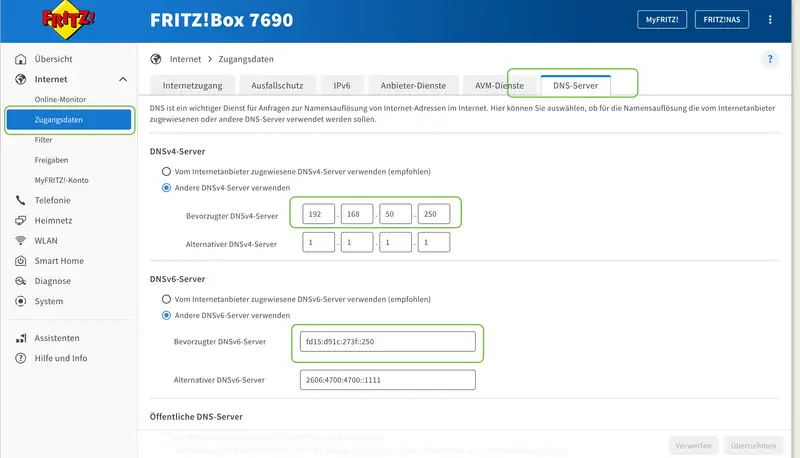
A network-wide ad blocker is useless if no device uses it. Instead of changing DNS settings on every phone, laptop, and TV by hand, I let the Fritz!Box hand out AdGuard as the default DNS server over DHCP. In the Fritz!Box UI, go to http://fritz.box → Internet → Account Information → DNS Server, enable “Use other DNSv4 servers”, and enter 192.168.50.250 as the preferred DNS server. For IPv6 DNS, add fd15:d91c:273f:0::250 as well. Then briefly toggle Wi-Fi off and on so devices pick up the new settings.
The result
Open the AdGuard query log and you can watch tracking domains get dropped in real time.
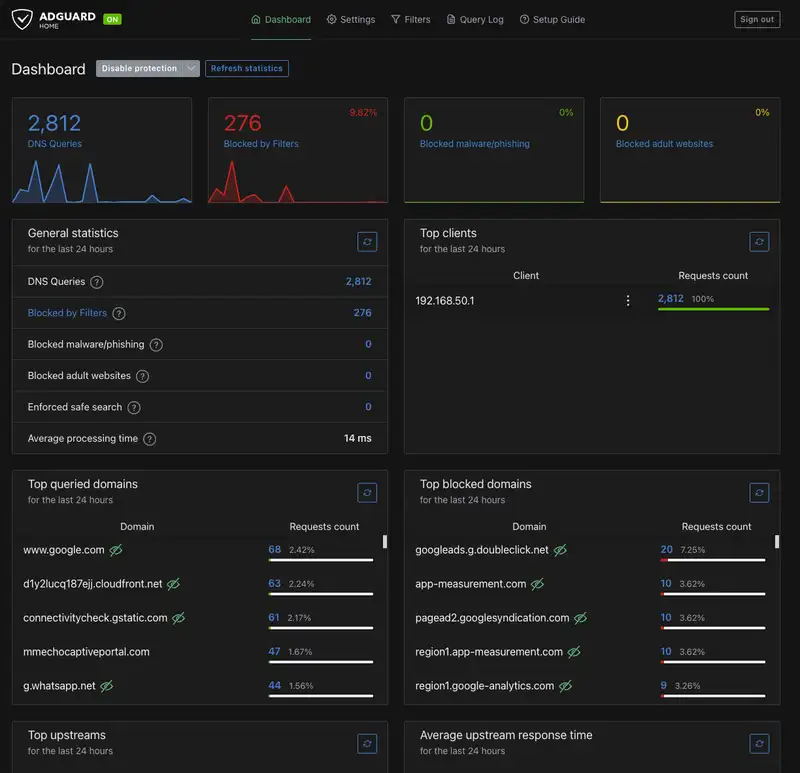 The YouTube app on the smart TV feels snappier because it spends less time on ad requests, and every device in the house sees less tracking.
A few things I took away: Macvlan is the cleanest way around a host-level port conflict like port 53; a two-network Docker setup only works reliably if the service binding is right; and a pragmatic bind mount sometimes beats a cleaner read-only config.