Designing my garden house in Python with CadQuery
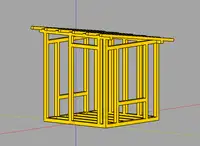
I’ve always had a complicated relationship with CAD software. I like what digital design tools can do. They just never seem to work with me.
If you’ve ever opened a CAD program and been confronted with a swarm of buttons, tabs, and menus, only to watch them rearrange completely after a version update, you know what I’m talking about. Most CAD tutorials aren’t much help either. They typically go something like: “Click here, then here, now switch to this tab, drag this, click this tiny icon that has moved since last version…” You get the idea.
The problem with freestyle
When I build something like furniture or a shed, I usually sketch it out freestyle, rough and spontaneous. That can be fun, but it tends to cost me extra on-the-fly fixes later because the original plan was too vague.
This time I was designing a garden house for my backyard, a small 2×2 m structure with a simple sloped roof, and I wanted a model where I could check every measurement before I started sawing. That’s when I found CadQuery.
CadQuery: CAD for people who write Python
CadQuery is a Python-based, parametric CAD scripting framework. Instead of dragging shapes around with a mouse, you write code to describe your 3D models.
At first, that sounded a bit intimidating, write code to do CAD? But it quickly clicked. I already know Python. Why not describe geometry using logic instead of wrestling with a GUI?
The code doesn’t rearrange itself after an update, and it lives in Git like everything else I write.
Here’s an example from my garden house model:
frame_width = 2000
frame_depth = 2000
beam_width = 95
beam_height = 95

main_frame = (
    cq.Workplane("XY")
    .box(frame_width, beam_width, beam_height)
    .translate((0, -frame_depth/2, beam_height/2))
)
That defines a single floor beam. To try 100 mm beams instead, I change one number and the rest of the model follows.
Tooling that works with you
To preview my models, I used CQ-editor, an IDE specifically built for CadQuery. It redraws the 3D model as you edit the Python script, so you see every change right away.
If you’re already a FreeCAD user and want to bring CadQuery into that ecosystem, there’s a CadQuery FreeCAD Workbench that runs CadQuery scripts inside FreeCAD, next to its native modeling tools.
The garden house project
My full CadQuery script is on GitHub: SlashGordon/gartenhaus.
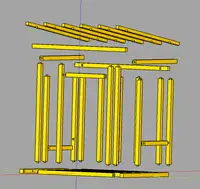
The script models the basic wooden structure: vertical beams, floor frame, roof supports, all in Python and rendered with CadQuery. I added an exploded view to see how the parts fit together, and a small generator that writes a JSON inventory of every part in the build so I know what to buy.
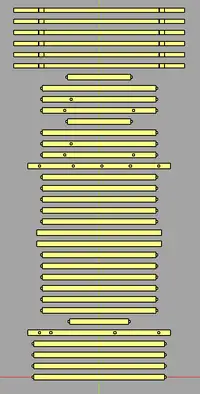
After working this way I’m hooked. I change a parameter and the whole model regenerates in seconds, and the designs are easy to share and version-control (goodbye, mystery .fcstd files with unclear changes).
Final thoughts
CadQuery is the first CAD tool that didn’t fight me. If GUI CAD programs have frustrated you and you already write Python, give it a try, whether for a 3D-printed part or a whole garden house.